Tester tracking
Who in your judge pool has actually been watched, by whom, and in which position — worked out from the live draw rather than typed into a spreadsheet twice.
The problem it solves
By the end of the prelims you have to decide who chairs a break round. To do that honestly you need to know which judges somebody trusted has actually sat with — and in what position, because watching someone panel tells you much less than watching them chair.
Most adjudication cores track this in a spreadsheet, filled in from memory between rounds. It goes wrong in the same three ways every time: it drifts out of step with the draw, nobody updates it during the round when they are busy, and it records “tested” without recording as what.
This tool takes the position that none of that should be typed at all. A judge has been tested when one of your testers sat on their panel — and the tab already knows who sat on which panel. So it is derived, every time it refreshes, and it cannot disagree with the draw.
What you look at
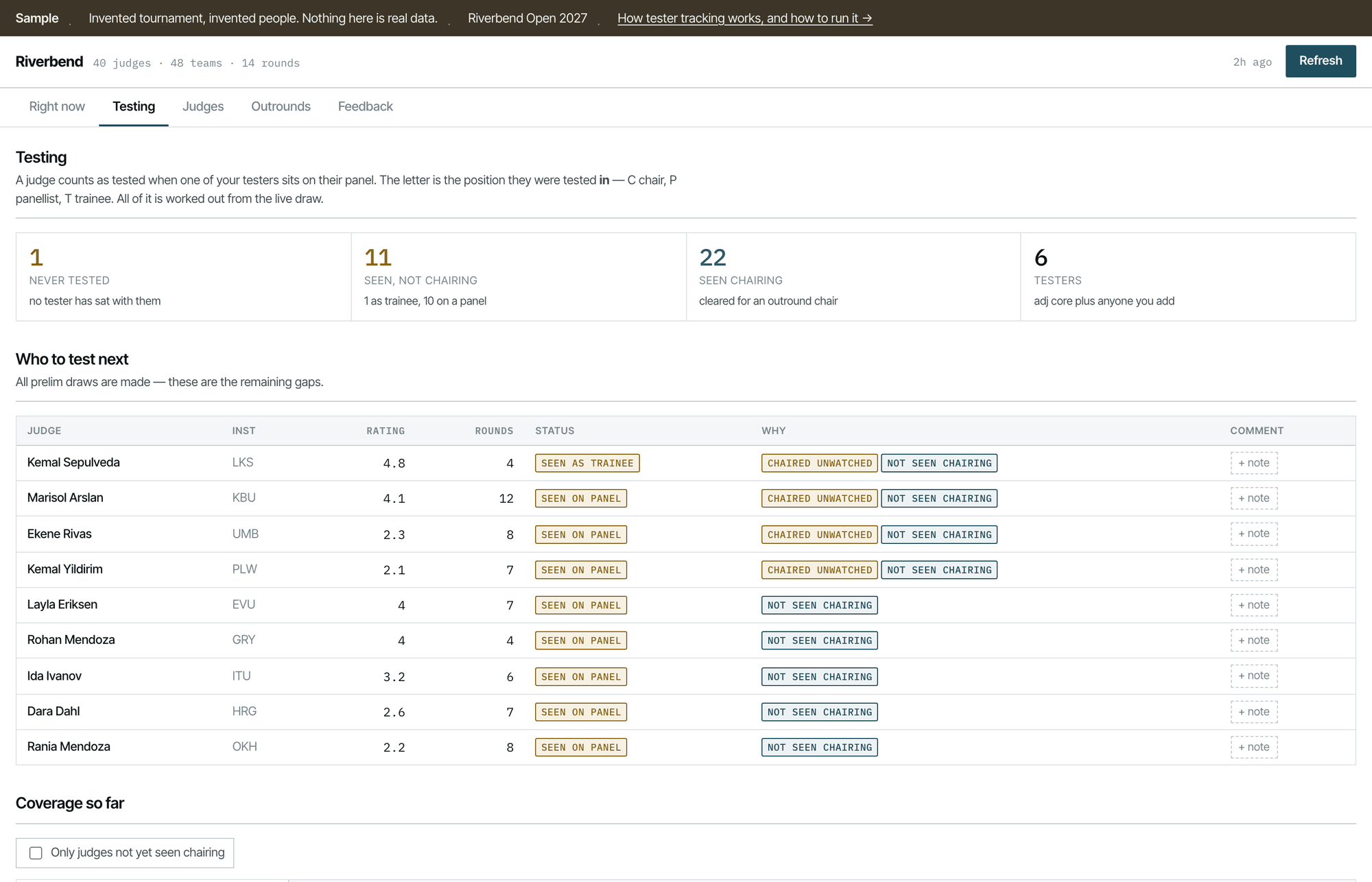
- 1The four numbers that matter
Never tested, seen but not chairing, seen chairing, and how many testers you have. This is the whole state of your pool in one line.
- 2Who to test next
Not a list of everybody — the remaining gaps, ordered so the top of the list is where a tester is worth spending.
- 3Why each one is a gap
“Chaired unwatched” means they have chaired real debates that nobody was in the room for. That is a different problem from never having been seen at all.
- 4Tested as what
Chair, panellist or trainee — the position the tested judge held, not the tester's.
- 5A note against a name
Free text, saved beside the tab and never written back to it.
The distinction the second and third pins are making is the point of the whole thing. “We have seen them” is not a single fact. A judge a tester has watched panel is a candidate for another panel; a judge who has been chairing all tournament with nobody in the room is an unanswered question, and quite a different one from a judge nobody has sat with at all.
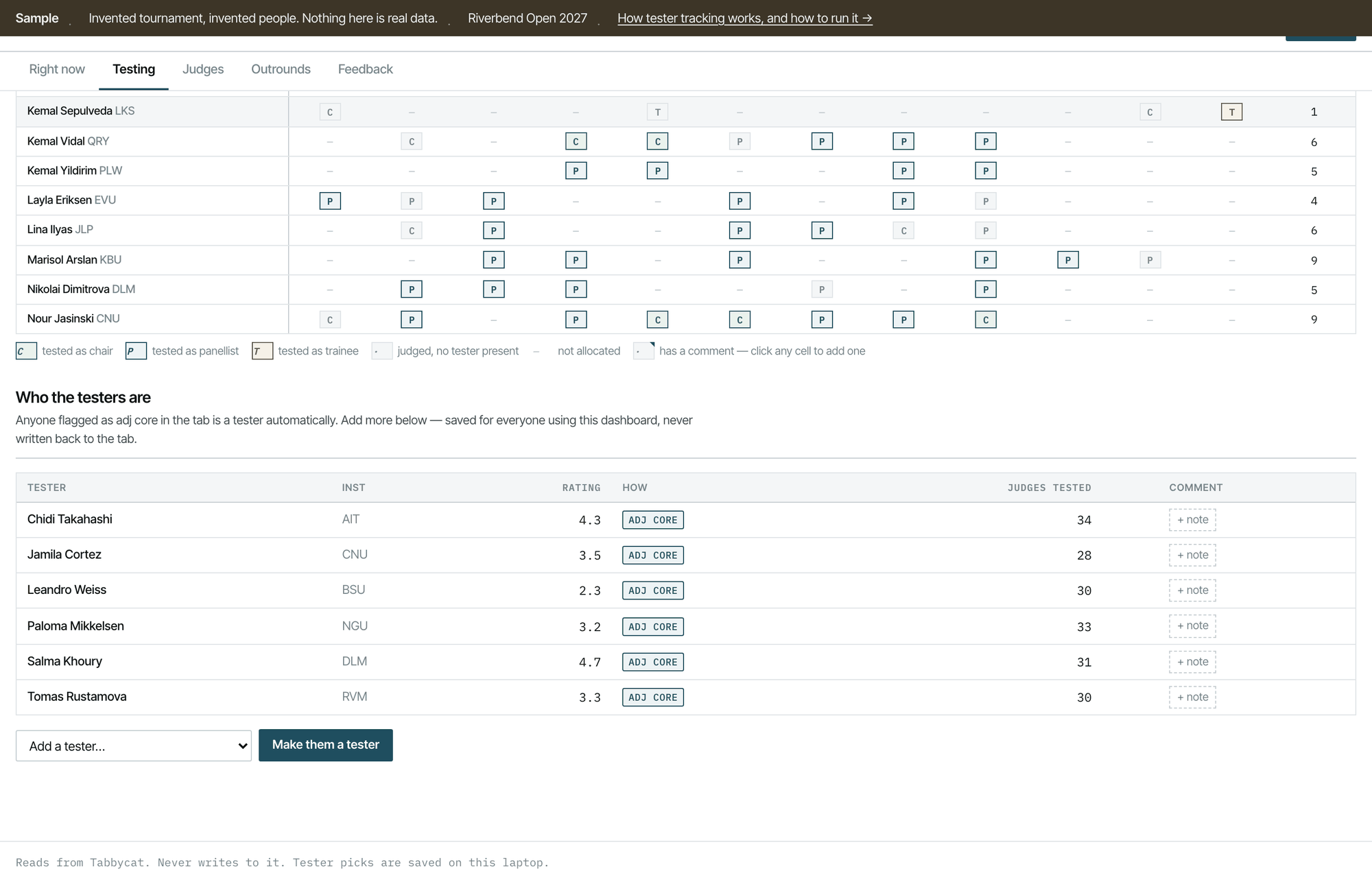
- 1Seen chairing
A tester was on this panel and this judge was the chair.
- 2Trainee counts
An early version only recognised chair and panellist, and so told judges nobody had sat with them when somebody had. Trainee is a real tested-as state.
- 3A dot is not a dash
A dot means they judged and no tester was there. A dash means they were not allocated. Collapsing those two loses the thing you are looking for.
- 4Testers come from the tab
Anyone flagged as adjudication core is a tester automatically, so this is right before you touch it.
- 5…and you can add more
If your testers are not all on the core. Stored beside the tab, never written into it.
How “tested” is decided
One sentence: a judge counts as tested in a round when at least one tester was on their panel in that round, and the recorded position is the one the tested judge held.
Two consequences worth knowing, because both have surprised people:
- Testers sitting with each other does not count. Two adjudication core members on a panel are not testing one another, so neither gets a mark.
- It is per round, not per tournament. A judge can be seen chairing in one round and panelling in another, and both are recorded; the summary uses the strongest position anybody has actually watched.
The derivation Technical
In tester-tracking/pull.py, after the draws are read, every
judge's panel for every round is known as a list of judge ids. For each
judge-in-a-round, the testers on that panel are
[x for x in sit["with"] if x in testers and x != aid]; if that is
non-empty and the judge is not themselves a tester, a test event is recorded
carrying the round, the position, and who witnessed it.
The tester set is {a["id"] for a in adjs if a["adj_core"]}
unioned with anyone added in the dashboard. The additions live in
adjcore_state.json beside the tab — deliberately outside
Tabbycat, because the toolkit does not write to a tab, and because “who we are
using as a tester this weekend” is not a fact about the tournament.
Panel size is read per round from the draw rather than configured, which matters more than it sounds: a tournament that runs panels of two in round one and three thereafter is completely normal, and the demo reproduces it.
What else is in there
Four other tabs, all supporting material for the same decision:
| Tab | What it is for |
|---|---|
| Right now | The round in play, its draw status, who has checked in, what is outstanding. A glance before a briefing. |
| Judges | The whole pool as a table — rating, rounds judged, chaired, feedback received, conflicts. Sortable, for when you want to answer a question this tool did not anticipate. |
| Outrounds | How many break-round rooms each category needs and therefore how many chairs you have to be confident about. Derived from break size and teams per debate. |
| Feedback | What has been written about each judge, and who still owes feedback. Needs a username and password as well as a token — see why. |
Where it runs
On your laptop. ./start and open the address it prints. Nothing
is published, nothing is shared, and it works on a hotel wifi that cannot reach
much.
There is also a hosted version in tester-tracking/cloud/, for an
adjudication core who want one shared view rather than one per laptop. It runs on
Netlify functions and needs its own setup; start with the local one.
An honest note about the hosted version. It works, but it is the least exercised part of this toolkit — it has not been run against a live tournament as recently as the rest. If you want a shared view, budget an hour and try it before your tournament rather than during it.